Book an Appointment
Call Delray Beach Computer Repair Service at (561) 208-8005
                   

(561) 208-8005

*


Delray Beach Computer Repair Service has provided the best mobile business computer repair in Delray Beach, FL and the greater Miami Metro Area since 1999. The term "mobile" means we come to you to resolve all your computer problems.

We repair business computer systems including laptops, desktops, PCs and Apple computers. One of our highly qualified staff will come to you, often the same day, to take care of all your repair needs.

Why not use the #1 rated business computer repair in Delray Beach, FL?

Computer Repair 4.9 / 5 stars from 324 reviews
Why use a computer tech when you can have a Delray Beach based Computer Engineer? Mon-Sun 8:00am - 8:00pm

Call us at (561) 208-8005

Text us at (561) 208-8005

Email us your questions

Book an Appointment

"Great service and friendly staff. Got my computer fixed same day, thank you!"
Miami Computer Repair Service 5 / 5 stars
"Dustin, the technician, did an awesome job. He kept me informed along the job. Techs like Dustin, make me a customer for life. "
Miami Computer Repair Service 5 / 5 stars
"Wonderful service, from the initial phone call and scheduling, very upfront on costs. The tech showed up on time, with a 15 min courtesy call, he was professional, knowledgeable and gave great advice. He replaced my hard drive and got me back up and running. I would recommend this service. I chose it because of all the positive online reviews and I was not disappointed."
Miami Computer Repair Service 5 / 5 stars
"Josh was again superb. He reinstalled my HP printer software and now I can scan once again. Much thanks for your service."
Miami Computer Repair Service 5 / 5 stars
"Fast service! Fixed all of my computer problems and was very helpful in making suggestions on products I needed. He arrived on time and was professional. Overall a very pleasant experience and I will call again!"
Miami Computer Repair Service 5 / 5 stars

Who is Delray Beach Computer Repair Service?

Delray Beach Computer Repair Service is owned by Matt Karls, an Electrical Engineer and a Computer Systems Engineer. We are a team of computer professionals focused on Service and quality, all our work is guaranteed.

If you have any computer, technology or IT problem in Delray Beach, FL we can fix it. We have been performing computer repair in Delray Beach full time since 1999. Feel free to give us a call or text us at (561) 208-8005.

Delray Beach Computer Repair Service's Computer Engineer

What is your Service Area for on-site Computer Repair?

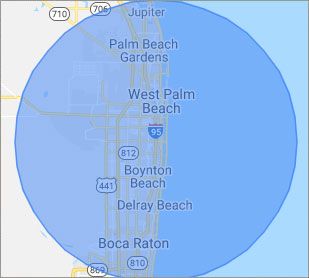
Our primary on-site mobile service areas include the greater Miami Metropolitan Area as well as the Tampa, Orlando and Jacksonville metro areas.

We provide remote and mobile computer repair in Delray Beach, Fort Lauderdale, Miami, West Palm Beach, Aventura, Doral, Jupiter, Key Biscayne, Margate, Miami Shores, Palm Beach Gardens, Palmetto Bay, Parkland, Pinecrest, Royal Palm Beach, and Wellington.

Our on-site Computer Service Area

What should someone expect that hires you for Computer Service?

Our mission is to fully resolve your computer problems quickly and affordably. If you want a Computer Engineer that can fix all of your computer problems instead of a computer tech, a computer geek, a technician or a computer guy that can only fix some of your problems; call us at (561) 208-8005.  

What types of Computer Services do you perform?

We Service businesses and business clients, including:
 
  • Diagnose / repair hardware or software problems
  • Spyware, malware, trojan and virus removal
  • Setup wireless and small business networks
  • Laptop repair, PC repair and Apple repair
  • Hard drive data recovery

Delray Beach Computer Repair Service Contact Information

Delray Beach Computer Repair Service
Delray Beach, FL 33444
(561) 208-8005

Delray Beach Computer Repair Service is a Karls Technology company

* *
*
*
*
  *
* *


*
*
* * * * * * * * * * * * * * *
4.9 / 5 stars from 324 reviews

"Great service and easy to work with!!!"

Miami Computer Repair Service 5 / 5 stars

"Anthony was very helpful in each step of the process, very professional."

Miami Computer Repair Service 5 / 5 stars

"My tech was great and appeared knowledgeable, I won't hesitate to contact again and I would highly recommend."

Miami Computer Repair Service 5 / 5 stars

"Taylor worked through 6 PC systems with great ease. Very satisfied with his skills and his help servicing our systems."

Miami Computer Repair Service 5 / 5 stars
Best Antivirus Software of 2026: The Ultimate Guide to Cybersecurity Brands

In 2026, the digital threat landscape has shifted. We are no longer just fighting simple viruses; we are defending against AI-generated phishing, sophisticated ransomware-as-a-service, and complex identity theft. Choosing the right antivirus brand is no longer optional—it is the foundation of your digital life. At Karls Technology, we’ve analyzed the top-performing security suites of the […] The post Best Antivirus Software of 2026: The Ultimate Guide to Cybersecurity Brands appeared first on Computer Repair Blog.

Multitask Using Task View

Having numerous virtual desktops might be very helpful if you only have access to a single monitor and are trying to do several tasks at once. In Windows 10, you can find this option in the Task View section. The Windows 10’s Task View feature allows you to use numerous programs at once in a […] The post Multitask Using Task View appeared first on Computer Repair Blog.

Southwest Airlines changes $8 internet prices

Southwest Airlines has recently announced a change in its in-flight internet pricing model, shifting from an $8 daily internet fee to an $8 per flight segment internet access fee. This decision has sparked conversation and interest from consumers... The post Southwest Airlines changes $8 internet prices appeared first on Computer Repair Blog.

Turn off Android Alerts to Help Battery

Faster smartphones are on the horizon, and with each software upgrade comes a slew of new functions designed to streamline your daily routine. Unfortunately, this technology may potentially shorten the lifespan of your device’s battery. If you have too many notifications set up on your Android, its battery life may suffer. To enable alerts on […] The post Turn off Android Alerts to Help Battery appeared first on Computer Repair Blog.

Upcoming VPN Feature on Windows 11

As of Windows 11, a message may soon appear in the system tray when you are connected to a VPN, allowing you to confirm that you are connected if you prefer anonymous browsing. Virtual Private Networks (VPNs) make it possible to surf the Internet without being traced. Unfortunately for companies, this location-insensitive technology is useless […] The post Upcoming VPN Feature on Windows 11 appeared first on Computer Repair Blog.

Applications Won’t Work

When an application fails to install on your computer or it won’t work properly, it could be for a handful of reasons. Your computer’s hardware and software probably aren’t compatible with the program in question. The prerequisites for running any given piece of software on a computer are known as its “system requirements.” These might […] The post Applications Won’t Work appeared first on Computer Repair Blog.

Changing Default Browser on Windows 11

Changing your default browser on Windows 11 is really easy. Click on the Start menu, then go to Settings, then Apps, and finally Default Apps. Simply choose your preferred browser and click “Set default” to make it your default browser. Keep in mind your desired default browser is selected in both the HTTP and HTTPS […] The post Changing Default Browser on Windows 11 appeared first on Computer Repair Blog.

Using Multiple Monitors

If you’re using multiple monitors, you may simply drag a window over to the side by pressing the Windows key and the appropriate arrow keys. Windows + P instantly enables a second monitor, while Shift + Windows Key + Arrows transfers the window to the next available monitor. Mission Control allows Mac users to view […] The post Using Multiple Monitors appeared first on Computer Repair Blog.

Add Your Own Keyboard Shortcut

Simple tasks like accessing a web page may be accomplished with a single click of a button rather than by inputting a URL, browsing through directories, or selecting individual icons. Keyboard shortcuts, or “hotkeys,” are combinations of keys that, when pushed simultaneously, perform a predetermined action. To create a shortcut, locate the file or directory […] The post Add Your Own Keyboard Shortcut appeared first on Computer Repair Blog.

Performance Verses Power Saver

In Windows, you may choose between three different methods for your CPU’s clock speed to increase. One can choose between a Balanced, High Performance, or Power Saver mode. High performance can help Windows operate quicker at the cost of battery life. The most suitable devices for this task are desktop computers. On a laptop, the […] The post Performance Verses Power Saver appeared first on Computer Repair Blog.